Built in one pain practice and used there every clinic day. Now onboarding the first eCW practices →
bellwiQ

For interventional pain physicians on eClinicalWorks

Just hit record.

A one-click Chrome plugin puts a Record button in the eCW chart you already have open. Minutes after the visit, the draft note is in that chart, section by section. You read it and sign it like any other note.

Just a simple Chrome plugin.No EMR modifications.All we need is an eCW account.
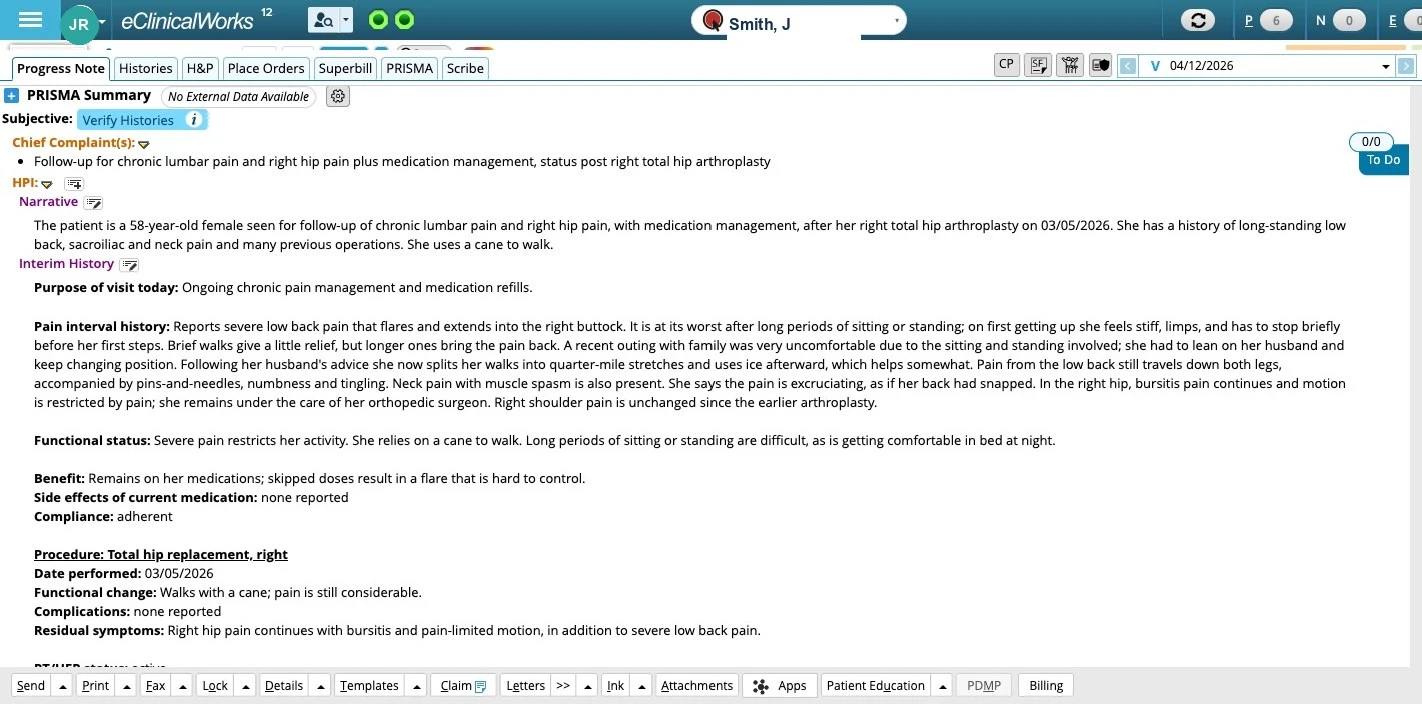
A real eClinicalWorks progress note written by bellwiQ: the Record button in the eCW bar, then Chief Complaint, HPI narrative, interim history, functional status, medication response and procedure response.
A real eCW chart. Note written by bellwiQ; de-identified composite patient, names changed.RecordStopDraft in chart

I use it every clinic day. On my last 204 signed notes I edited about one line in ten. The rest I signed as written.

I built bellwiQ inside my own practice, on more than 200,000 of our own pain visits. It writes my notes, I read them, and I sign them. The edits are small and almost always in the plan or the HPI, and the E/M level it chose stood on 95% of those notes. It also gets better the longer I use it: every edit I make is measured, and the ones that keep recurring become rules, so each month it writes a little closer to how I would. No other practice uses it yet. The first ones that do, I set up myself.

Purvi Patel, MD, Gulf Coast Pain and Spine, Houston, Texas
Founder
01

How it works

Three steps, none of them new.

Step 1

Hit record.

The button is in the open eCW chart, so the recording belongs to that patient and that visit.

Step 2

See your patient.

Talk the way you always do. Say the side and the level out loud.

Step 3

Hit stop.

Minutes later the draft is in the chart for you to edit and sign. The exam stays yours: it will not write a finding it could not see.

What it does not do

  • It does not write the exam. That section is yours.
  • It does not write ASC operative notes, only clinic notes.
  • It does not work on any EMR but eClinicalWorks.
  • It does not sign. A bad draft is yours to catch. Tell us, and a recurring one becomes a rule you approve.
02

The note

Clinical documentation, not a transcript.

HPI in your categories. Assessment from the chart's own diagnoses, side and level checked first. A plan under each diagnosis, in the Treatment Notes the payer sees. Orders queued as pending. The exam is yours to enter; no exam finding is taken from the audio.

What the note carries

Into eCW's fields.

  • What prior-auth reviewers ask for. Conservative care and its duration. Both medial branch blocks and the relief from each before an RFA. Interval since the last RFA. Fluoroscopy, contrast, side and levels. PDMP checked, UDS result, opioid agreement, MME. If the chart has it, the note says it. If not, the note says it is missing.
  • E/M level and CPT codes. The E/M level is computed by fixed rules, with the reasoning written out. On a procedure visit, the CPT codes come with their modifiers, and the procedure goes into the surgical history with date and code. You and your biller confirm the codes.
  • Matched to your signed notes. Your HPI sections, how imaging is presented, a UDS section or not, a seven-part plan or a simple one. Your diagnosis list and procedure catalog as they are in eCW. In the first two weeks we read your signed notes and set the sections to match, and you approve sample notes before it goes live.
  • It gets better the more you use it. Every edit you make before signing is measured. An edit that keeps recurring is written into a rule for your notes, which you approve. The note you sign in month three is closer to yours than the one you signed in week one.
What the HPI says before an RFA.From the chart
HPI
Procedure Response
Blocks
Right L3, L4 and L5 medial branch blocks 04/02/2026 and 05/07/2026 with 80% and 85% relief for the duration of the anesthetic, with improved sitting and walking tolerance documented after each.
Next
Proceeding to right L4-L5 and L5-S1 radiofrequency ablation.
Last RFA
None on this side.
If missing
If the second block is not in the chart, the note says so instead of inventing one.
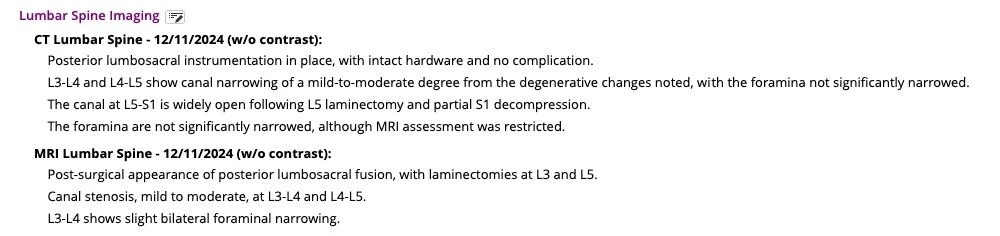
The Lumbar Spine Imaging section of a real eCW note written by bellwiQ: the two newest studies, a CT and an MRI, each with findings listed level by level.
Imaging

As it lands in the HPI. Every lumbar study in the chart, newest first, findings by level. Two of seven shown; click to read all of it.

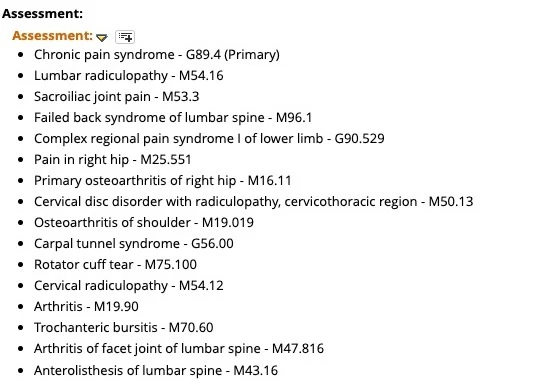
The Assessment section of the same eCW note: sixteen diagnoses with specific ICD-10 codes, from chronic pain syndrome G89.4 and lumbar radiculopathy M54.16 to anterolisthesis of lumbar spine M43.16.

Assessment

The diagnoses already in the chart, with their codes.

Sixteen on this chart. Lumbar radiculopathy M54.16, not low back pain. Cervical disc disorder with radiculopathy M50.13. Anterolisthesis M43.16. The codes a prior-auth reviewer and a payer both expect. It keeps the chart's own codes, even the one unspecified arthritis; it does not invent specificity the chart lacks.

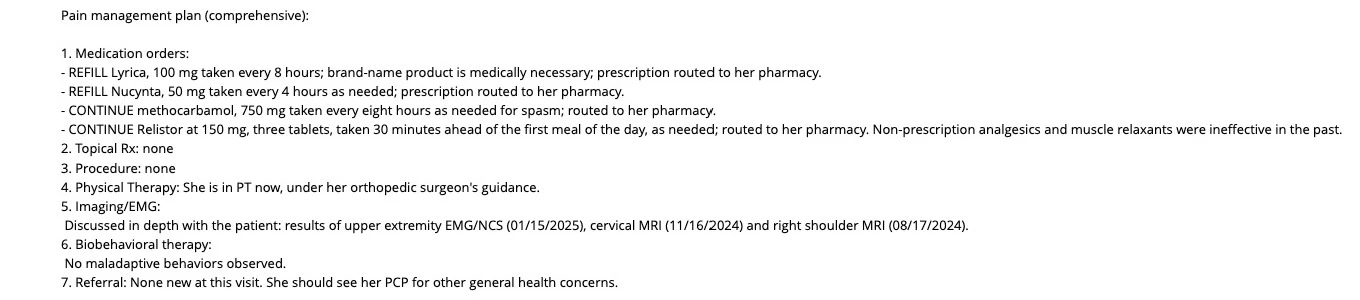
The seven-part pain management plan under Chronic pain syndrome in the same eCW note: medication orders with refill and continue lines, topical Rx, procedure, physical therapy, imaging and EMG discussed, biobehavioral therapy, referral.
Plan

Under each diagnosis. The seven-part plan this practice uses, with the refill and continue orders written out. Chronic pain syndrome shown; every diagnosis below it gets its own. Click for the full section.

03

Why I built it

The practice did well. The notes did not.

Where the rules came from

The signed notes and claims of one pain practice, the founder's own, more than 200,000 pain management encounters. It writes that practice's notes every clinic day, and the rules came from the notes signed there, not from a pain template bolted onto a general scribe. We track every edit you make, and you can see your own edit rate.

I own a pain practice in Houston. Every year the documentation and the compliance work grew, and more of it came home with me. I left clinic at five to be with my kids, and after they went to sleep I sat back down to two hours of charts, most weekends too. You cannot remember the conversation you had on Tuesday morning when you are finishing that note on Thursday night.

I hired scribes at $15 to $20 an hour. They could type what was said and pull in a template. The clinical reasoning was still mine to add at night, or every note looked the same. Then the AI scribes. They transcribe well. But even with a long, careful template, what came back was sections to paste into eCW: diagnosis codes wrong, the plan not in my format, surgeries missed, and things in the note that were never said in the room.

So I built this inside my own practice, on my own charts, and it has written my notes every clinic day since June. I read each one and sign it. The charts are no longer waiting for me at nine. I want the same for other physicians in private practice.

Purvi Patel, MD, Gulf Coast Pain and Spine, Houston, Texas

04

Pricing

$1,000 a month per provider.

Physicians and NPs alike. Billed monthly. No setup fee, no contract, cancel any time.

Why not $200?

A $200 scribe writes down the visit. This one also reads the chart and the payer rules.

An ambient scribe, including the one built into eCW, listens to the room and writes what it heard well. It does not know the MRI from last December, the two medial branch blocks and what each one gave, the last RFA date, the PDMP, the UDS, or what the payer wants to see before it approves. Those are in the chart, not in the conversation. The difference in price is a note written from both.

If all you need is the conversation written down, buy the $200 scribe. This is for the practice whose notes have to survive a prior-auth reviewer and an audit.

  • The prior-auth packet, in the note. Both blocks with the relief from each, the interval since the last ablation, the conservative care and how long. If the chart lacks one, the note says so.
  • Imaging and procedure history, from the chart. Every study by level, newest first, and every prior procedure with its date, already in the note when you open it.
  • The chart's own diagnosis codes. Reconciled to the rows already on the chart, side and level checked, so M54.16 does not become low back pain.
  • Coding that follows the documentation. The E/M level by fixed rules with the reasoning written, CPT codes with modifiers on procedure visits, the procedure added to the surgical history.
  • The plan where the payer reads it. Under each diagnosis in eCW's Treatment field, with the refill and continue orders written out and new orders queued pending.
  • Your edits become rules. Every change you make before signing is measured; a recurring one becomes a rule you approve.
Remote human scribeAmbient AI scribebellwiQ
Monthly cost per provider$1,500 to $3,000$100 to $200$1,000
What it writes fromThe visit, and what they look upThe visitThe visit and the chart
Where the note landsIn eCW, from a templateA paragraph, or generic SOAP sectionsIn eCW's own fields, per diagnosis
Diagnosis codesWhatever the template saysAs dictated, often unspecifiedThe chart's own codes, side and level checked
Prior-auth documentationOnly if you rewrite the templateOnly what was said aloudBlocks, relief, interval, conservative care
Knows the prior procedures and imagingIf they look them upOnly what was said aloudThe studies and prior blocks in the chart; says when one is missing
When a payer rule changesYou retrain themYou edit your own templateWe change the rule and show you the same note before and after
E/M and CPTYou code itYou code itWritten with the reasoning; you confirm
$1,000per provider per month. One price, physicians and NPs. No tiers, no setup fee, no contract.

The E/M level follows the documentation, never the other way around: on the founder's last 204 signed notes it was left as written on 95%. Where the documentation supports a 99214 over a 99213, that is about $35 at national Medicare rates before payer mix, and one or two such visits a day cover the fee over twenty clinic days.

What it takes

  • 01

    One eCW user, scribe rights only.

    You create it and you control it. It cannot sign or send claims, and every entry it makes is in your eCW audit log under its own name.

  • 02

    A one-click Chrome plugin.

    It puts the Record button in the chart on any computer where you open eCW. That is the only thing installed. Nothing goes on your servers, and beyond that one user no eCW setting changes.

  • 03

    About two weeks from signed BAA to first notes.

    We read your signed notes and set your HPI sections, imaging layout and plan format to match. You approve sample notes before it goes live.

  • 04

    The next few eCW practices come on one at a time, with me on the phone.

    Purvi Patel, MD, Gulf Coast Pain and Spine, Houston, Texas, Phone

FAQ

Questions physicians ask first.

Do I still sign the note?
Yes. Every note it writes waits in eCW as an unsigned draft. If no draft appears, you write the note as you do today. bellwiQ never signs and never submits anything.
What if it writes something I did not say?
It can mishear you or misread the chart, so read the draft. It draws only on the visit audio and the chart: the prior signed note, PDMP, UDS, medications and imaging. We compare your edits with the draft, and an edit that keeps recurring we propose as a rule for your notes, which you approve before it is used.
Who controls the eCW user?
You do. Scribe rights only; it cannot sign or send claims. Each entry is logged under the bellwiQ user in your eCW audit log, and you can disable it any time. The note belongs to the provider who saw the patient, physician or NP, and is signed under their name.
Do patients have to consent to the recording?
You tell the patient the visit is recorded to write the note. Some states require everyone in the room to agree, and Florida is one. We give you the sentence to say and a paragraph for your intake form.
What happens to the audio and the notes?
We sign a BAA before any chart is touched. Your audio and notes are used only to write your notes, and they are not used to train any model.
Which EMRs, and which notes?
eClinicalWorks only. If you are on something else, we cannot help you yet. It writes clinic progress notes, new patients and televisits included. It does not write ASC operative notes.
What does it cost?
$1,000 a month per provider, physicians and NPs alike. No setup fee, no contract, cancel any time. Your notes are already in eCW, so there is nothing to export if you leave.

Thirty minutes, one note

Come read a note.

We open a test chart and read a note it wrote, the way you would before signing. Bring a visit type you care about, an ESI, an SCS trial, a televisit, and we show that one. Thirty minutes.

No contract · BAA with every practice · Cancel any time